


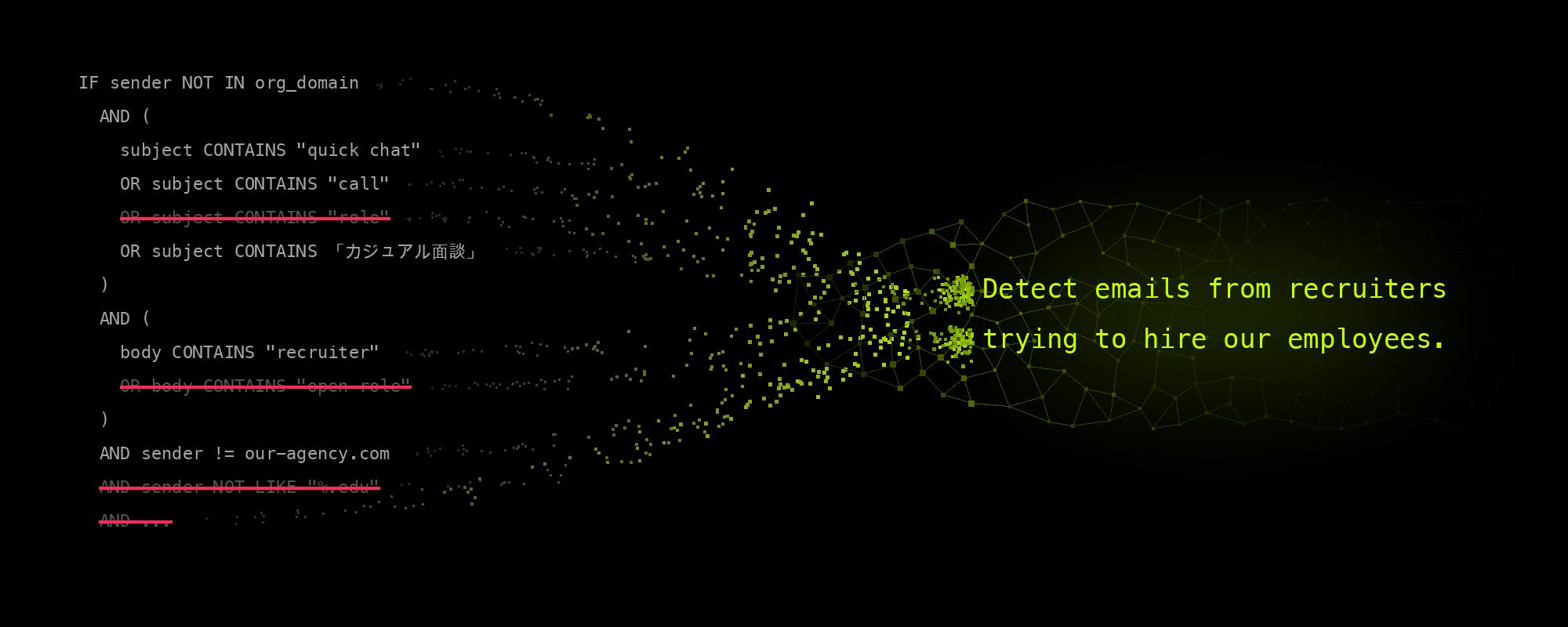
Let’s say your company has a policy against job hunting on work laptops. Your competitors are vying for your top talent, and now their recruiters are sliding into employee inboxes with “quick chat?” emails by the dozen. Your SOC gets the ticket: make them go away.
No problem – you open the rule engine and write:
IF, the sender is outside the organization’s domain
AND, the subject includes “quick chat” OR “call” OR “opportunity” OR “role”
AND, the body mentions “interview” OR “open role” OR “recruiter”
THEN, move to SPAM
It’s clunky, but it catches every example you were sent.
A few days later, your HR partner from Japan pings you. Their team is still receiving an insanely large volume of recruiter emails and you realize you didn’t account for non-English emails. You patch the rule:
AND, the subject includes “quick chat” OR “call” OR “opportunity” OR “role” OR「カジュアル面談」OR 「お話ししませんか」OR 「求人のご紹介」OR 「ポジションのご案内」
AND, the body mentions “interview” OR “open role” OR “recruiter” OR「面接」OR 「募集ポジション」OR 「採用担当者」OR 「転職エージェント」.
While you’re in there, you check what else the rule has been catching. You realize you’ve been blocking emails from an agency your company hired to fill some open roles. An exclusion would help so you add a new condition:
AND, the sender-domain is not your-recruiters-domain[.]com
Then summer comes, and every student emailing HR about internships lands in spam too.
At this point you’ve spent more hours on this rule than on anything else that is potentially dangerous in your queue. And you think to yourself – “there has to be a better way…”
Rules are great when you can spell out the exact condition. But when all you know is the theme (“recruiters, not ours, not interns”) and the details keep shifting, it’s far easier to explain the problem to an AI than to keep stacking ANDs and ORs that might align with your detection problem
In this blog post we discuss Custom AI Models: a product that puts this “AI first” control in the hands of SOC teams.
Standing on the shoulders of strong ML foundations
Behavioral machine learning (ML) and LLM Agents (GenAI) are often framed as competing approaches for email threat detection. At Abnormal we asked, “what can they do together?” The outcome was Custom AI Models, a new detection tool that allows customers to use natural language to describe behaviour that matters to their organization, and turn that into control over our detection engine. Enabling threat remediation and fine-tuning of detection controls quickly, with just a description and a few example emails.
After spending close to a decade building an industry leading behavioural AI system, our research teams have recently had the ability to invest more in ML efforts that are orthogonal to the “detection problem”. The outcome of these efforts include:
Vector databases (you can read more about how we succeeded in Building vector search at billion scale)
Text embedding models at scale (including transformer models and lightweight models – see our blogpost on How We Made Multilingual Embeddings Work at 60,000 Queries a Second)
Internal tooling to build and deploy AI Agents for bespoke agentic tasks (see how Agent Reliability Is a Distributed Systems Problem)
Through 2025 and 2026, while our R&D teams were building this new techstack; our Product and Customer Success teams were seeing an influx of requests for more control over our detection engine. The timelines lined up perfectly – we had on our hands a real customer problem, and a new toolkit that unlocked a new dimension for looking at email threat detection.
How Abnormal puts you in the AI’s driver seat
Abnormal AI protects more than 5000 customers, including 30% of the Fortune® 500 as of July 31 2026. At this scale, you get slight variations in the subdefinitions of “unwanted” emails, across the several languages, industries and regions in which our customers operate.
To tune detection control across business/industry specific needs, traditional solutions in the Email Security industry lean on some form of a rule engine. Where explicit conditions in the email need to be met for a detection outcome to be applied. This is also a capability that Abnormal AI offers in the “Control Center” as “Custom Rules”.
Anyone who’s tried to solve adversarial problems (detection systems where attackers adapt to counteract defenses you put in place) with a rule engine, is likely very familiar with its advantages and pitfalls. While the system lets you clearly outline a list of conditions that must be met for downstream behaviour to be triggered. Similar to the example at the start of this blogpost, those conditions quickly become a painful game of whack-a-mole, constantly playing catch-up against:
Never before seen patterns that match the intent of what you want detected
Attackers adapting to your defenses and shifting their attack vectors
Biases in definitions of attributes (i.e. features) used in rule definitions
String obfuscation, etc.
The second half of our Control Center - Custom AI Models, pushes the frontier of what’s possible for email security practitioners. It allows analysts to get hands-on control of our detection engine. Not with rules, but by steering ML and GenAI systems in the direction of the detection problem you want to solve.
When to use Custom Rules – and when to use Custom AI Models
The Control Center was launched at Fal.Con 2026, with Custom AI Models (in General Availability) and Custom Rules (in Early Access). Both give you control over detection, but they let you express that control differently. Here’s our recommendation for choosing between the two when trying to solve a detection need:
Use Custom Rules when you can define the condition precisely: a known sender, a specific attribute, or a clear combination of signals. You know exactly what should trigger the outcome.
Use Custom AI Models when you can describe the behavior you care about, but its wording and other details may vary. You provide the intent and examples; the model looks for that pattern in the context of your organization’s email.
How you can train a Custom AI Model
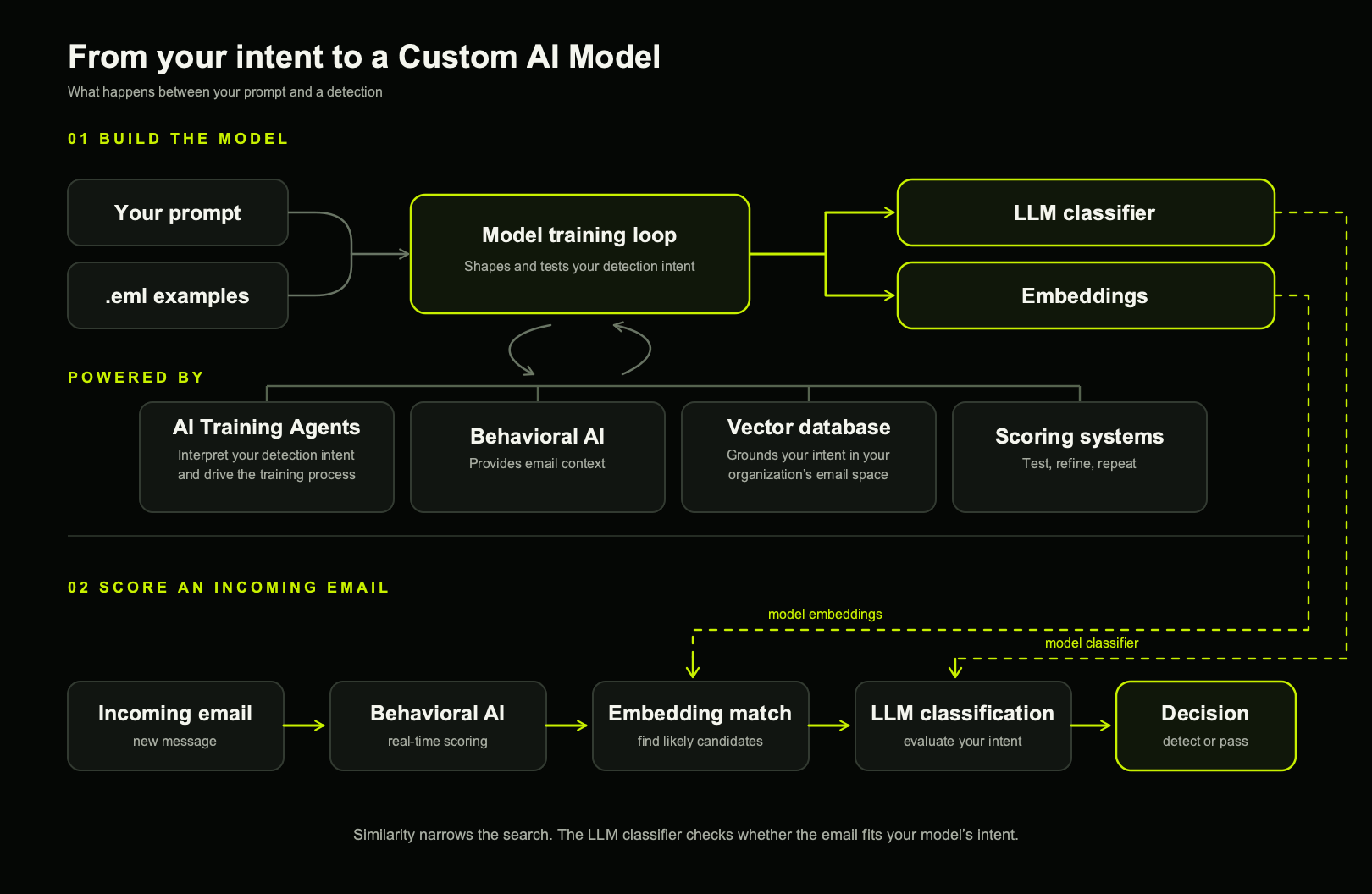
To use Custom AI Models, you need a natural language description of what you want detected – the “Detection Criteria” and some .eml files (as few as 1) that supplements intent as “Training Material”; and that’s it, you can now train a Custom AI Model!
Our harness for Custom AI Models, then uses state of the art LLMs and our machine learning toolkit to build representations (in the form of embeddings) for your task that can be understood by our behavioural AI!
Custom AI Models is powered by our internal vectorDB, which uses these representations to effectively label regions of “embedding space” with the target behaviour you want to see. To paraphrase, we one-shot the emails you want detected, relative to the types of emails your company normally receives.
In addition to these representations, during the training process Custom AI Models also trains an LLM based classifier that is used to supplement the detections your Custom AI Model makes. This means that any detection made by Custom AI Models has passed two checks: a similarity match against the representations and an LLM. This aligns detections with the security analyst’s underlying detection intent, by balancing contextual understanding of Generative AI models with the machine learning signals of behavioural AI models.
If you’re an Abnormal AI customer, we recommend reviewing the user manuals prior to starting your first model train (check out our articles here and here).
How do your Custom AI Models fit into Abnormal AI’s detection landscape?
Part of training a Custom AI Model includes testing it against historical emails before it goes live. This allows you to see what your model would have caught, refine it, and compare it to Abnormal’s judgments. Once set live, it brings your organization’s definition of “unwanted” into the same detection and remediation experience your team already uses with Abnormal.
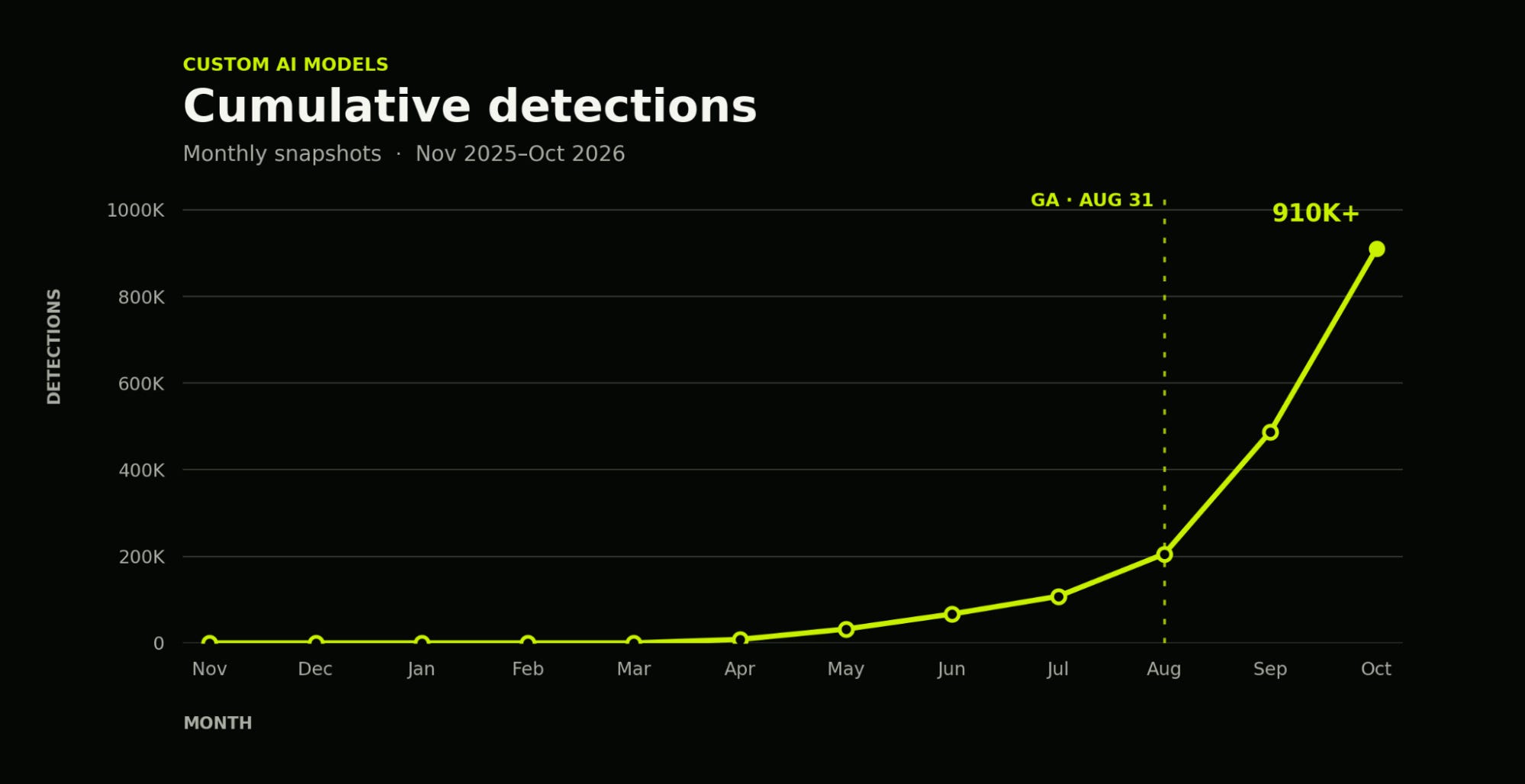
In the first 60 days after launch at Fal.Con 2026 (General Availability), customers have built more than 100 Custom AI Models, and used them to generate more than 700,000 detections, showing a real need for this sort of disruption in the threat detection landscape. That’s what excites us the most about this product: we’ve built something that lets your team recognize a pattern that’s unique to your business. If you can describe it, you can use that knowledge to train a model and put AI to work to solve that problem for you.
Custom AI Models in Action – an off-ramp from the game of “rule whack-a-mole”
As an engineering team that created a net new surface for SOC Analysts to engage with email detection, it’s been so encouraging to see the awesome models our customers have trained. It sheds light on common detection problems that previously lacked a resilient solution.
The example at the start of this blogpost reflects a real pattern! Since launching Custom AI Models in General Availability (August 2026), we’ve seen roughly 10% of the feature’s users train a model targeting that very problem. If you are also trying to solve a similar problem for your organization, would you rather create and maintain a rigid rule that might cover all edgecases, or a Custom AI Model that only needs an example .eml file and this illustrative prompt:
Detect e-mails offering the recipient recruitment services or job offers. The sender email could be from any domain. The sender must identify themselves as a recruiter or member of HR (or equivalent team), from a company that is not [insert your company], offering to discuss job opportunities or career options.Patent Pending
Aspects of technologies described in this blog are the subject of a pending U.S. patent (Patent Application No. 19/437,095).
This post was authored by Udayan Sarin, Machine Learning Engineer at Abnormal AI.
If this is how you want to work, we’re hiring! Subscribe to Abnormal Builder’s Substack to see how we actually build with AI, with real stories from our engineering and product teams.
